> ## Documentation Index
> Fetch the complete documentation index at: https://overmind-b84ae13c-codex-workshop-queue-capacity.mintlify.site/llms.txt
> Use this file to discover all available pages before exploring further.
# Datasets
> Turn your production traffic into the eval and training data your runs read.
A dataset is the data your eval runs, optimisation runs and training runs read. You bring rows — selected traces, uploaded files or API rows — and shape them until they fit what you need. Overmind's own agent does most of that shaping for you.
Two things say what a dataset is for: its **intent** (`train` or `eval`) and the **capability** it belongs to. Capability is optional. Purpose is explicit in Console creation; a pending intent from other sources is resolved during preparation. Ask the dataset's chat to change either before a run uses it.
## Create a dataset
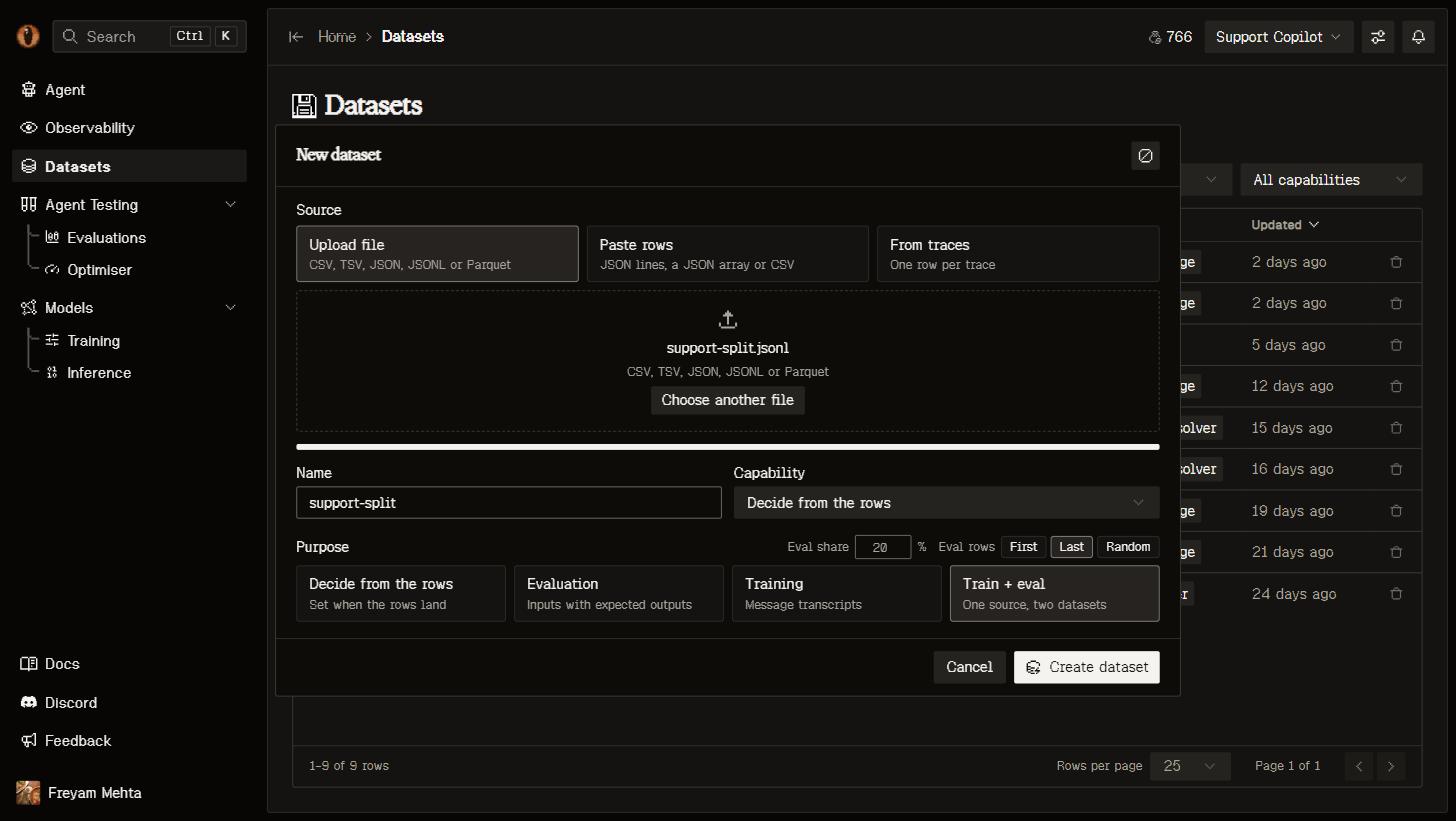
Choose **Upload file** or **Data from traces** from **New dataset**, then enter a name and select **Evaluation**, **Training**, or **Train + eval**. Capability can be **Decide from the rows**, **None**, or a project capability. **None** keeps the dataset unbound.
**Train + eval** creates two datasets from the combined source. The editable evaluation share defaults to 30%; choose first, last or random ordering. Exact duplicates are removed before splitting, while matching inputs, traces, conversations and synthetic seed descendants stay together. Preview counts are estimates: grouping can change the final share, and at least two independent groups are required. Custom grouping and stratification remain available through REST and MCP. Near-duplicate similarity is not checked.
 Select runs in [Observability](/core/observability#from-traces-to-datasets) and **Add to dataset**, or choose **Data from traces** to take everything matching your current filters.
Each run lands as one row: its input and delivered output, the full transcript and tools in OpenAI wire shape, model, tokens, cost, status, duration and its score. A transcript already satisfies the training contract; for eval data the agent renames `output` to `expected_output` for you.
Drop **CSV, TSV, JSON, JSONL or Parquet** files anywhere on the Datasets page, or choose them in the dialog. Removable file chips show names, types, sizes and row counts. Up to 100 files form one source, appended in selection order. The upload endpoint also accepts NDJSON and gzip, up to 2 GB per file. Columns and types come from the files — numbers stay numbers, nested JSON stays JSON.
From a terminal: `overmind dataset upload FILE [--intent train|eval] [--capability ]`. See the [CLI](/platform/cli#overmind-dataset).
Nothing is reshaped on the way in. Your rows land exactly as they arrived, and every change after that is a step you can see and undo.
A single value longer than 200,000 characters — a tool call carrying a serialised agent state, say — is replaced with a preview marker. The rest of the row lands intact.
### Retry an interrupted import
Imports use a dedicated worker queue. If an import waits too long or its worker stops, the dataset shows an error and keeps its uploaded source. Select **Retry import** to resume the saved import. You do not need to upload the file again unless the error says the source is missing or has changed.
Waiting for a worker and reading the source have separate time limits. Retrying preserves the original source and split settings. The attempt limit prevents repeated failures from running indefinitely. After the source lands, **Agent queued** means preparation is waiting for a workshop worker; the source is already readable. You can draft a message while the agent is queued or working and send it when the current turn finishes. Workshop queue waiting and execution also have separate time limits.
## Shape it by asking
Opening a dataset puts you in the Data Workshop: your versions down the left, the chain of steps in the middle, and the dataset's agent on the right.
Select runs in [Observability](/core/observability#from-traces-to-datasets) and **Add to dataset**, or choose **Data from traces** to take everything matching your current filters.
Each run lands as one row: its input and delivered output, the full transcript and tools in OpenAI wire shape, model, tokens, cost, status, duration and its score. A transcript already satisfies the training contract; for eval data the agent renames `output` to `expected_output` for you.
Drop **CSV, TSV, JSON, JSONL or Parquet** files anywhere on the Datasets page, or choose them in the dialog. Removable file chips show names, types, sizes and row counts. Up to 100 files form one source, appended in selection order. The upload endpoint also accepts NDJSON and gzip, up to 2 GB per file. Columns and types come from the files — numbers stay numbers, nested JSON stays JSON.
From a terminal: `overmind dataset upload FILE [--intent train|eval] [--capability ]`. See the [CLI](/platform/cli#overmind-dataset).
Nothing is reshaped on the way in. Your rows land exactly as they arrived, and every change after that is a step you can see and undo.
A single value longer than 200,000 characters — a tool call carrying a serialised agent state, say — is replaced with a preview marker. The rest of the row lands intact.
### Retry an interrupted import
Imports use a dedicated worker queue. If an import waits too long or its worker stops, the dataset shows an error and keeps its uploaded source. Select **Retry import** to resume the saved import. You do not need to upload the file again unless the error says the source is missing or has changed.
Waiting for a worker and reading the source have separate time limits. Retrying preserves the original source and split settings. The attempt limit prevents repeated failures from running indefinitely. After the source lands, **Agent queued** means preparation is waiting for a workshop worker; the source is already readable. You can draft a message while the agent is queued or working and send it when the current turn finishes. Workshop queue waiting and execution also have separate time limits.
## Shape it by asking
Opening a dataset puts you in the Data Workshop: your versions down the left, the chain of steps in the middle, and the dataset's agent on the right.
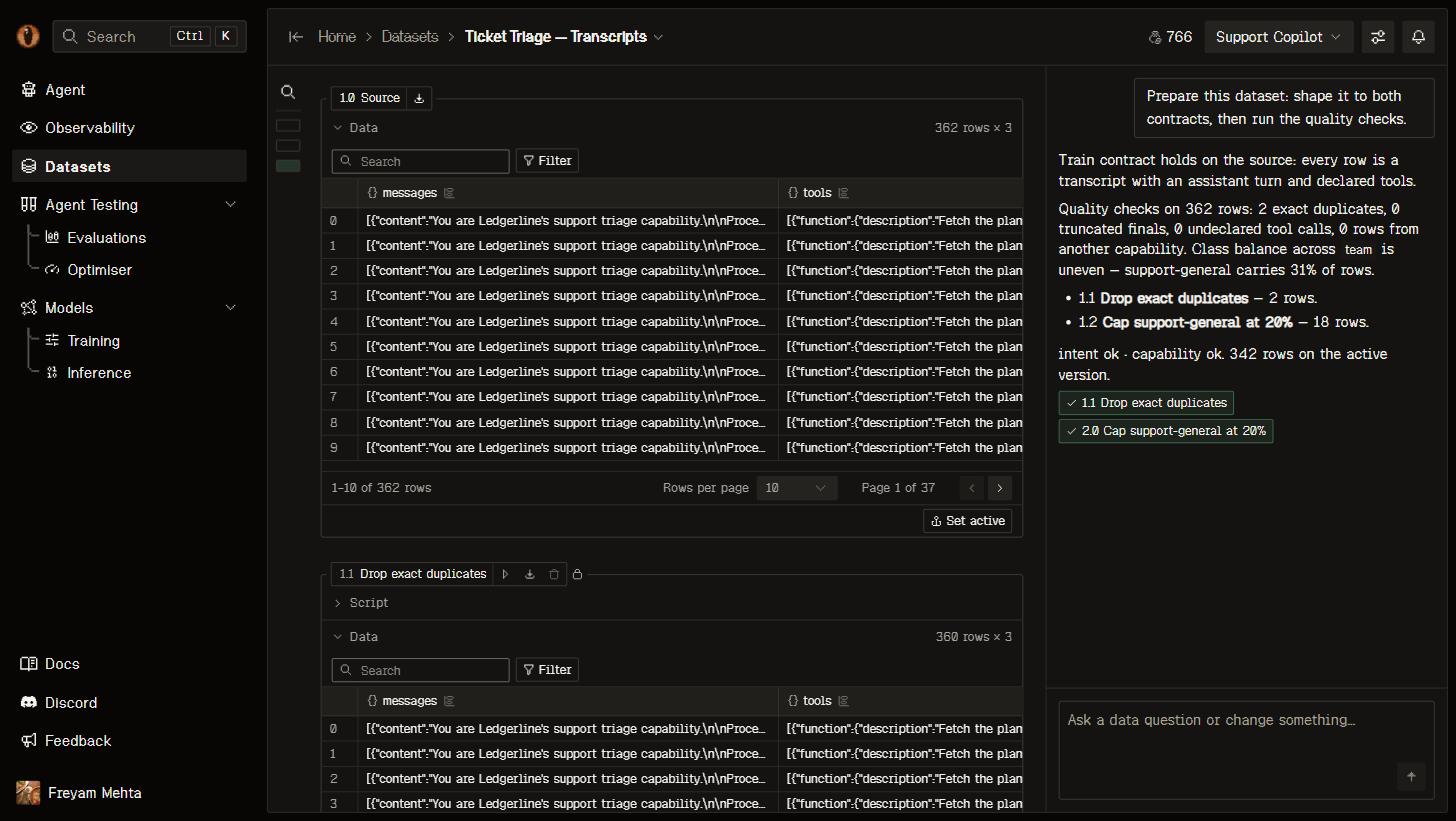 The agent goes first, before you type anything. It receives whole-frame task-family profiles and downstream training/evaluation requirements, prepares the data, audits it, repairs supported findings and checks again. Example previews are bounded, but profile counts cover every row. An audit alone does not finish preparation.
Mechanical, evidence-preserving restructuring and declared-rule derivations can apply directly. Semantic judgement calls and replacements of existing task instructions require a concrete proposal, including during initial preparation. Follow-up row exclusions also require review, regardless of percentage. The proposal shows identity-matched examples and coverage changes; **Approve** applies that exact preview, and **Deny** leaves the data unchanged. Changed source data or capability context invalidates the proposal. Once all proposals have decisions, the agent resumes the original request.
Training retains messages and tools. Evaluation separates the final assistant target into expected\_output while keeping the complete input prefix, instructions, evidence and recorded tool results. An application record ID is not a substitute for that evidence. The source stays unchanged, and hidden row/group/seed lineage survives projections and stays out of model features.
After that, ask for what you want in plain language. "Drop rows whose answer is under ten tokens." "Split each transcript per assistant turn." "Use this for training instead." You see exactly which rows and values changed against the step before; changes requiring judgement wait for review.
Each step is Python you can read and edit yourself: it reads the previous table as `df` and leaves the next one in `df`, with pandas, numpy, DuckDB, scikit-learn and the rest already available. Edit a step and everything after it re-runs. If a step fails, you get the traceback and your last good version stays in use.
### Quality checks and synthetic data
Deterministic quality checks execute against every row and record boolean-or-null results. The workshop can also run [semantic decision checks](/agent-testing/decision-engine#semantic-dataset-checks) for task alignment, input evidence and answer support. Jev uses separate evidence and answer columns with generative fallback. Batches of up to 200 rows resume against the same version and check contract; missing evidence and unprocessed rows remain unknown. An answer is never its own evidence. Audits do not authorize edits.
Quality and capability-alignment findings remain advisory, including train/eval overlap. Only unreadable or technically incompatible data blocks a consumer. Reports preserve measured coverage and provenance; unsupported labels are not guessed.
Ask explicitly for synthetic examples. Validated batches accumulate in one active generated version, with no draft or Apply step. Retries do not add duplicate rows; interrupted generation keeps completed batches and can continue to the same target. Used versions cannot receive more batches. Seed lineage, capability context, instructions and generation engine are recorded. Synthetic answers still need independent review and cannot be split away from their seeds into held-out evaluation. Automatic preparation never generates synthetic rows.
Chat activity is chronological, with expandable thinking and approval checkpoints. Clearing chat does not remove applied versions. The agent runs on OpenRouter, or as a Cursor Composer session when `CURSOR_API_KEY` is set (recommended); see [Self-hosting](/platform/self-hosting#the-data-workshop-agent).
## Versions
Every step that runs is a version — the source is 1.0, each step adds 1.1, 1.2, and so on. The version a run reads is the **active** one, which is the last one that ran unless you pick another.
The moment a run uses a version, that version is frozen: its rows can't change and neither can any step before it. So an eval run from last week still means what it meant, while you keep curating on top. Carry on and the next run picks up your new active version.
## Contracts
Overmind measures every version against what your intent actually needs, and tells you on the page whether it fits:
| Intent | Shape | Per row | Feeds |
| - | - | - | - |
| **Train** | A `messages` column, every row a chat transcript with an assistant turn (`tools` optional) | Task instructions and tools are preserved; model-specific formatting is checked during training preparation | [Model training](/models/training) |
| **Eval** | An `input` on every row and an `expected_output` column with real references | Model transcripts retain task context and evidence; application entry-point objects carry the declared input keys | [Eval runs](/agent-testing/eval), the [Optimiser](/agent-testing/optimisers), backtests |
Rows that cannot meet a technical contract are counted with the reason, never quietly filled in with a default. Ask the dataset's agent to repair them. Task alignment, input evidence, answer support, output schema, capability mismatch and overlap findings are warnings; they do not require quality approval before proceeding.
Training reports overlap without dropping selected rows. Checks include normalized inputs, trace/conversation identities, configured groups, case identifiers and synthetic seed lineage. Internal identity columns are hidden from the table, filters and column counts, not removed from stored data.
### What valid rows look like
A `messages` column with a conversation that ends with the assistant, in OpenAI chat format. Rows that call tools also carry a `tools` column with the tool definitions.
```json theme={null}
{"messages": [
{"role": "system", "content": "You triage support tickets."},
{"role": "user", "content": "My card was declined twice."},
{"role": "assistant", "content": "Route to billing. Priority: high."}
]}
```
An `input` on every row and an `expected_output` to score against. `input` can be text, an object or a conversation. Other columns are kept.
```json theme={null}
{"input": "My card was declined twice.", "expected_output": "billing"}
```
A file does not need to arrive in this shape; the agent converts it during preparation.
## From your coding agent
`/overmind dataset` covers the loop: land a dataset from traces, inspect it, query it with SQL, ask its agent for a change, accept a proposal. Files and exports go through the CLI, because bytes don't travel over MCP:
```bash theme={null}
overmind dataset upload transcripts.jsonl --intent train --wait # wait for landing and the first preparation
overmind dataset upload tickets.jsonl --split 20 --wait # one file as a train and an eval dataset
overmind dataset export --cell 1.2 --output rows.jsonl
```
See [MCP](/platform/mcp) and the [CLI](/platform/cli#overmind-dataset).
## Use it elsewhere
Export a version as JSONL or CSV from its title chip in the workshop, or over the API:
```bash theme={null}
curl -H "X-Api-Key: $OVERMIND_API_KEY" \
"https://api.overmindlab.ai/api/datasets/{id}/export/?fmt=jsonl"
```
An export is a plain download and never counts as a use, so it won't freeze anything. Local loops — the optimiser and backtests — pull the exact version they were given and cache it under `.overmind/datasets/`.
Everything the workshop does is available over REST: create a dataset, add or edit a step, run the chain, message the agent, page through rows with their diff marks, and stream events as they happen. See [Building a dataset](/platform/api#building-a-dataset).
## When something is refused
| Message | Fix |
| - | - |
| `Row 12 has 3 cells; the header has 2.` | A CSV cell holds the delimiter. Quote it, or use JSONL |
| `Column 'notes' appears twice.` | Rename one of the columns |
| `The file is not UTF-8.` | Save the file as UTF-8 and upload it again |
| `Line 40 is not valid JSON.` | Fix that line; the file lands only when every line parses |
| `Two rows are needed to split.` | Add rows, or create a single dataset |
| `no messages column` / `no input column` | Select **Ask Overmind to fix it** on the cell |
| `Longest dataset row is ≈N tokens but this model's … context is M tokens` | Drop or shorten the long rows, or pick a model with a longer context |
| `The dataset is busy.` | The agent or a run is working on it. Wait for it to finish |
## Limits
| Limit | Value |
| - | - |
| One uploaded file | 2 GB |
| One `.json` document | 256 MB; use JSONL above that |
| One value in a row | 200,000 characters; longer values become a preview marker |
| One cell's run time | 300 seconds |
## Next steps
Measure variants against a baseline with the dataset you just built.
Fine-tune on your own traffic and benchmark it against what you ship today.
Let candidate code changes compete over the same rows.
More real runs in means better data to curate from.
This documentation is built and hosted on [Mintlify](https://mintlify.com), a developer documentation platform.
The agent goes first, before you type anything. It receives whole-frame task-family profiles and downstream training/evaluation requirements, prepares the data, audits it, repairs supported findings and checks again. Example previews are bounded, but profile counts cover every row. An audit alone does not finish preparation.
Mechanical, evidence-preserving restructuring and declared-rule derivations can apply directly. Semantic judgement calls and replacements of existing task instructions require a concrete proposal, including during initial preparation. Follow-up row exclusions also require review, regardless of percentage. The proposal shows identity-matched examples and coverage changes; **Approve** applies that exact preview, and **Deny** leaves the data unchanged. Changed source data or capability context invalidates the proposal. Once all proposals have decisions, the agent resumes the original request.
Training retains messages and tools. Evaluation separates the final assistant target into expected\_output while keeping the complete input prefix, instructions, evidence and recorded tool results. An application record ID is not a substitute for that evidence. The source stays unchanged, and hidden row/group/seed lineage survives projections and stays out of model features.
After that, ask for what you want in plain language. "Drop rows whose answer is under ten tokens." "Split each transcript per assistant turn." "Use this for training instead." You see exactly which rows and values changed against the step before; changes requiring judgement wait for review.
Each step is Python you can read and edit yourself: it reads the previous table as `df` and leaves the next one in `df`, with pandas, numpy, DuckDB, scikit-learn and the rest already available. Edit a step and everything after it re-runs. If a step fails, you get the traceback and your last good version stays in use.
### Quality checks and synthetic data
Deterministic quality checks execute against every row and record boolean-or-null results. The workshop can also run [semantic decision checks](/agent-testing/decision-engine#semantic-dataset-checks) for task alignment, input evidence and answer support. Jev uses separate evidence and answer columns with generative fallback. Batches of up to 200 rows resume against the same version and check contract; missing evidence and unprocessed rows remain unknown. An answer is never its own evidence. Audits do not authorize edits.
Quality and capability-alignment findings remain advisory, including train/eval overlap. Only unreadable or technically incompatible data blocks a consumer. Reports preserve measured coverage and provenance; unsupported labels are not guessed.
Ask explicitly for synthetic examples. Validated batches accumulate in one active generated version, with no draft or Apply step. Retries do not add duplicate rows; interrupted generation keeps completed batches and can continue to the same target. Used versions cannot receive more batches. Seed lineage, capability context, instructions and generation engine are recorded. Synthetic answers still need independent review and cannot be split away from their seeds into held-out evaluation. Automatic preparation never generates synthetic rows.
Chat activity is chronological, with expandable thinking and approval checkpoints. Clearing chat does not remove applied versions. The agent runs on OpenRouter, or as a Cursor Composer session when `CURSOR_API_KEY` is set (recommended); see [Self-hosting](/platform/self-hosting#the-data-workshop-agent).
## Versions
Every step that runs is a version — the source is 1.0, each step adds 1.1, 1.2, and so on. The version a run reads is the **active** one, which is the last one that ran unless you pick another.
The moment a run uses a version, that version is frozen: its rows can't change and neither can any step before it. So an eval run from last week still means what it meant, while you keep curating on top. Carry on and the next run picks up your new active version.
## Contracts
Overmind measures every version against what your intent actually needs, and tells you on the page whether it fits:
| Intent | Shape | Per row | Feeds |
| - | - | - | - |
| **Train** | A `messages` column, every row a chat transcript with an assistant turn (`tools` optional) | Task instructions and tools are preserved; model-specific formatting is checked during training preparation | [Model training](/models/training) |
| **Eval** | An `input` on every row and an `expected_output` column with real references | Model transcripts retain task context and evidence; application entry-point objects carry the declared input keys | [Eval runs](/agent-testing/eval), the [Optimiser](/agent-testing/optimisers), backtests |
Rows that cannot meet a technical contract are counted with the reason, never quietly filled in with a default. Ask the dataset's agent to repair them. Task alignment, input evidence, answer support, output schema, capability mismatch and overlap findings are warnings; they do not require quality approval before proceeding.
Training reports overlap without dropping selected rows. Checks include normalized inputs, trace/conversation identities, configured groups, case identifiers and synthetic seed lineage. Internal identity columns are hidden from the table, filters and column counts, not removed from stored data.
### What valid rows look like
A `messages` column with a conversation that ends with the assistant, in OpenAI chat format. Rows that call tools also carry a `tools` column with the tool definitions.
```json theme={null}
{"messages": [
{"role": "system", "content": "You triage support tickets."},
{"role": "user", "content": "My card was declined twice."},
{"role": "assistant", "content": "Route to billing. Priority: high."}
]}
```
An `input` on every row and an `expected_output` to score against. `input` can be text, an object or a conversation. Other columns are kept.
```json theme={null}
{"input": "My card was declined twice.", "expected_output": "billing"}
```
A file does not need to arrive in this shape; the agent converts it during preparation.
## From your coding agent
`/overmind dataset` covers the loop: land a dataset from traces, inspect it, query it with SQL, ask its agent for a change, accept a proposal. Files and exports go through the CLI, because bytes don't travel over MCP:
```bash theme={null}
overmind dataset upload transcripts.jsonl --intent train --wait # wait for landing and the first preparation
overmind dataset upload tickets.jsonl --split 20 --wait # one file as a train and an eval dataset
overmind dataset export --cell 1.2 --output rows.jsonl
```
See [MCP](/platform/mcp) and the [CLI](/platform/cli#overmind-dataset).
## Use it elsewhere
Export a version as JSONL or CSV from its title chip in the workshop, or over the API:
```bash theme={null}
curl -H "X-Api-Key: $OVERMIND_API_KEY" \
"https://api.overmindlab.ai/api/datasets/{id}/export/?fmt=jsonl"
```
An export is a plain download and never counts as a use, so it won't freeze anything. Local loops — the optimiser and backtests — pull the exact version they were given and cache it under `.overmind/datasets/`.
Everything the workshop does is available over REST: create a dataset, add or edit a step, run the chain, message the agent, page through rows with their diff marks, and stream events as they happen. See [Building a dataset](/platform/api#building-a-dataset).
## When something is refused
| Message | Fix |
| - | - |
| `Row 12 has 3 cells; the header has 2.` | A CSV cell holds the delimiter. Quote it, or use JSONL |
| `Column 'notes' appears twice.` | Rename one of the columns |
| `The file is not UTF-8.` | Save the file as UTF-8 and upload it again |
| `Line 40 is not valid JSON.` | Fix that line; the file lands only when every line parses |
| `Two rows are needed to split.` | Add rows, or create a single dataset |
| `no messages column` / `no input column` | Select **Ask Overmind to fix it** on the cell |
| `Longest dataset row is ≈N tokens but this model's … context is M tokens` | Drop or shorten the long rows, or pick a model with a longer context |
| `The dataset is busy.` | The agent or a run is working on it. Wait for it to finish |
## Limits
| Limit | Value |
| - | - |
| One uploaded file | 2 GB |
| One `.json` document | 256 MB; use JSONL above that |
| One value in a row | 200,000 characters; longer values become a preview marker |
| One cell's run time | 300 seconds |
## Next steps
Measure variants against a baseline with the dataset you just built.
Fine-tune on your own traffic and benchmark it against what you ship today.
Let candidate code changes compete over the same rows.
More real runs in means better data to curate from.
This documentation is built and hosted on [Mintlify](https://mintlify.com), a developer documentation platform.