
train or eval) and the capability it belongs to. Capability is optional. Purpose is explicit in Console creation; a pending intent from other sources is resolved during preparation. Ask the dataset’s chat to change either before a run uses it.
Create a dataset
Choose Upload file or Data from traces from New dataset, then enter a name and select Evaluation, Training, or Train + eval. Capability can be Decide from the rows, None, or a project capability. None keeps the dataset unbound. Train + eval creates two datasets from the combined source. The editable evaluation share defaults to 30%; choose first, last or random ordering. Exact duplicates are removed before splitting, while matching inputs, traces, conversations and synthetic seed descendants stay together. Preview counts are estimates: grouping can change the final share, and at least two independent groups are required. Custom grouping and stratification remain available through REST and MCP. Near-duplicate similarity is not checked.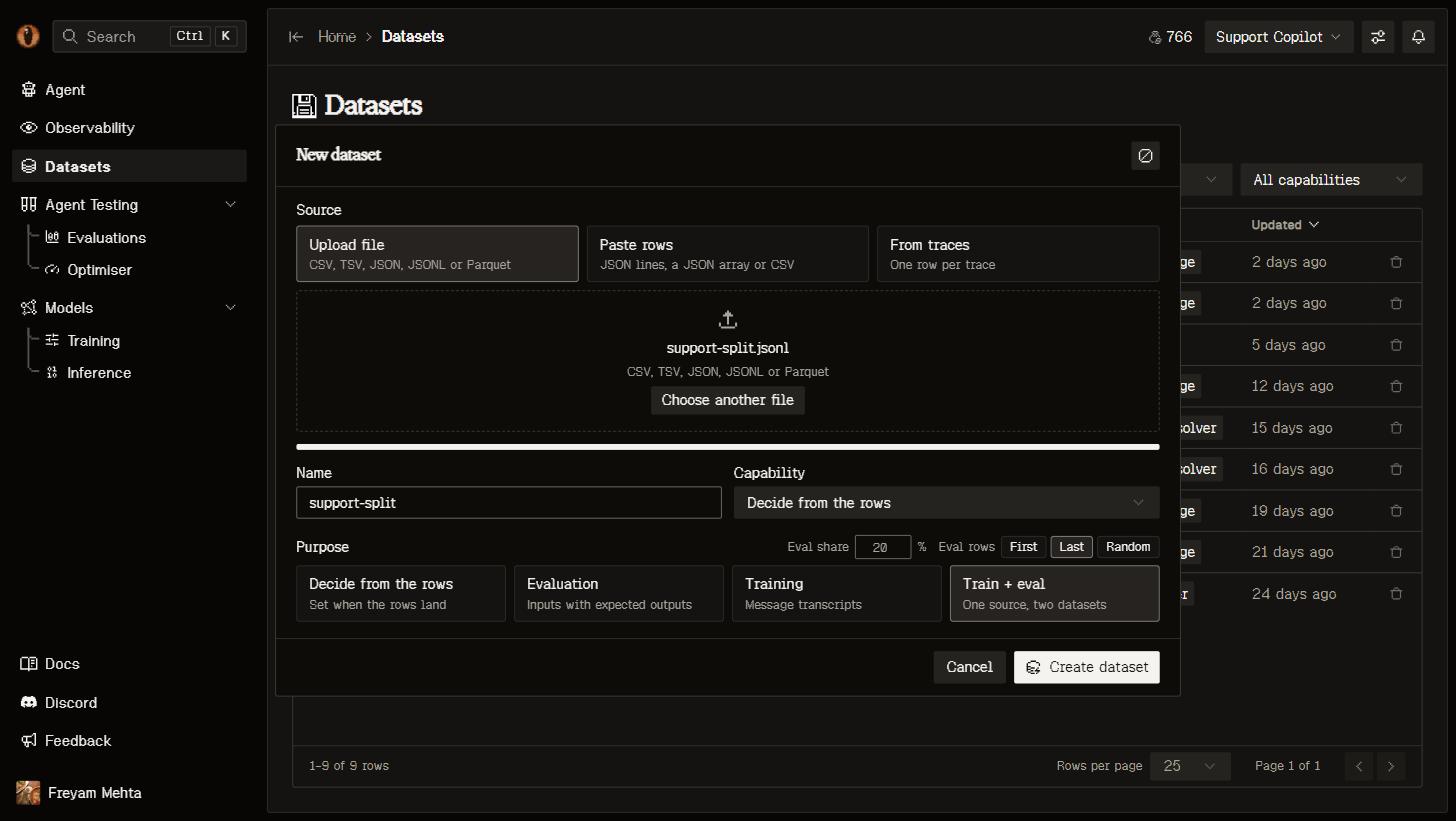
The New dataset dialog: source, name, capability and purpose.
- From your traces
- Upload files
Select runs in Observability and Add to dataset, or choose Data from traces to take everything matching your current filters.Each run lands as one row: its input and delivered output, the full transcript and tools in OpenAI wire shape, model, tokens, cost, status, duration and its score. A transcript already satisfies the training contract; for eval data the agent renames
output to expected_output for you.Retry an interrupted import
Imports use a dedicated worker queue. If an import waits too long or its worker stops, the dataset shows an error and keeps its uploaded source. Select Retry import to resume the saved import. You do not need to upload the file again unless the error says the source is missing or has changed. Waiting for a worker and reading the source have separate time limits. Retrying preserves the original source and split settings. The attempt limit prevents repeated failures from running indefinitely. After the source lands, Agent queued means preparation is waiting for a workshop worker; the source is already readable. You can draft a message while the agent is queued or working and send it when the current turn finishes. Workshop queue waiting and execution also have separate time limits.Shape it by asking
Opening a dataset puts you in the Data Workshop: your versions down the left, the chain of steps in the middle, and the dataset’s agent on the right.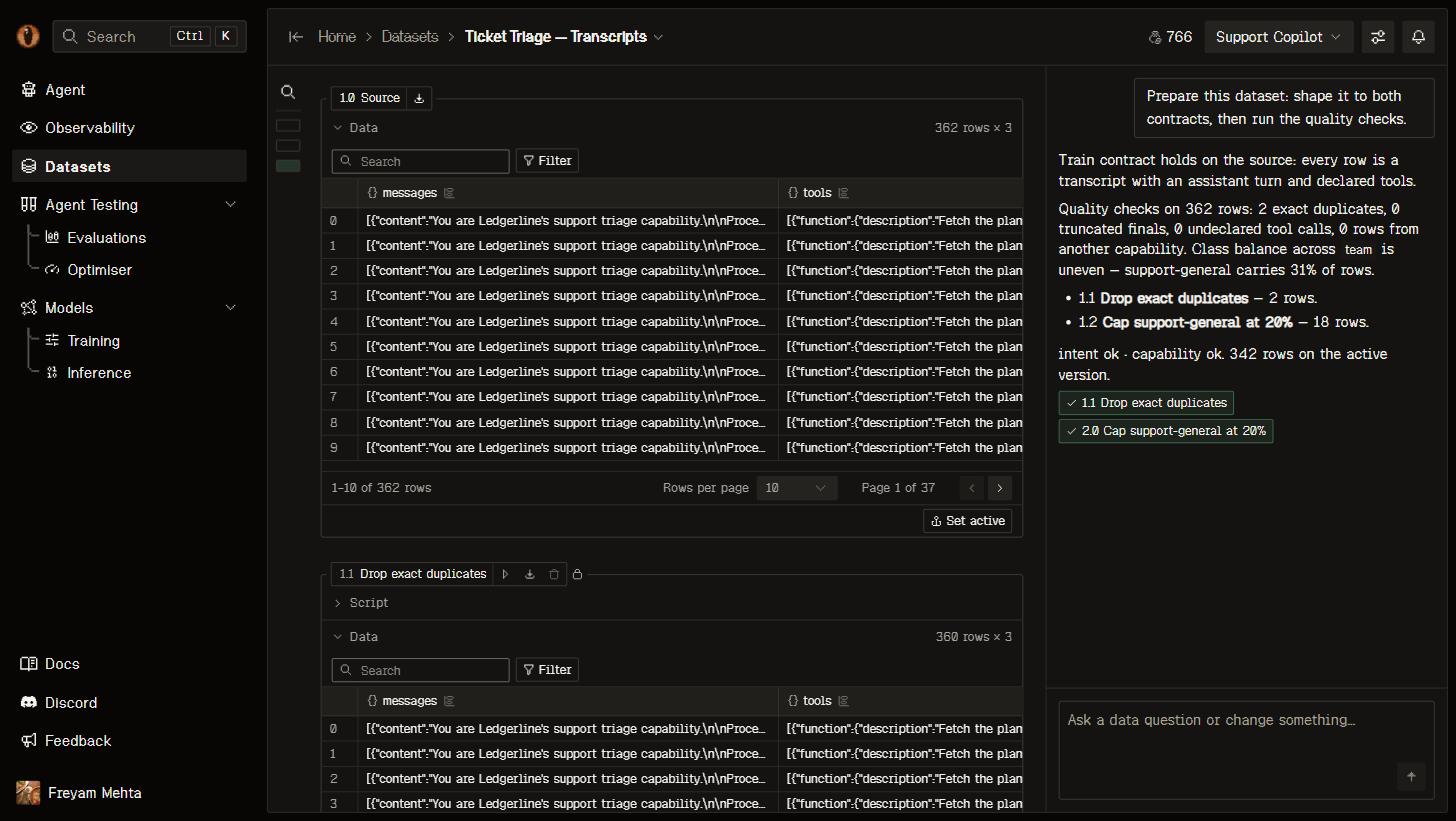
The Data Workshop: the version outline, the chain of steps, and the agent's first turn.
df and leaves the next one in df, with pandas, numpy, DuckDB, scikit-learn and the rest already available. Edit a step and everything after it re-runs. If a step fails, you get the traceback and your last good version stays in use.
Quality checks and synthetic data
Deterministic quality checks execute against every row and record boolean-or-null results. The workshop can also run semantic decision checks for task alignment, input evidence and answer support. Jev uses separate evidence and answer columns with generative fallback. Batches of up to 200 rows resume against the same version and check contract; missing evidence and unprocessed rows remain unknown. An answer is never its own evidence. Audits do not authorize edits. Quality and capability-alignment findings remain advisory, including train/eval overlap. Only unreadable or technically incompatible data blocks a consumer. Reports preserve measured coverage and provenance; unsupported labels are not guessed. Ask explicitly for synthetic examples. Validated batches accumulate in one active generated version, with no draft or Apply step. Retries do not add duplicate rows; interrupted generation keeps completed batches and can continue to the same target. Used versions cannot receive more batches. Seed lineage, capability context, instructions and generation engine are recorded. Synthetic answers still need independent review and cannot be split away from their seeds into held-out evaluation. Automatic preparation never generates synthetic rows. Chat activity is chronological, with expandable thinking and approval checkpoints. Clearing chat does not remove applied versions. The agent runs on OpenRouter, or as a Cursor Composer session whenCURSOR_API_KEY is set (recommended); see Self-hosting.
Versions
Every step that runs is a version — the source is 1.0, each step adds 1.1, 1.2, and so on. The version a run reads is the active one, which is the last one that ran unless you pick another. The moment a run uses a version, that version is frozen: its rows can’t change and neither can any step before it. So an eval run from last week still means what it meant, while you keep curating on top. Carry on and the next run picks up your new active version.Contracts
Overmind measures every version against what your intent actually needs, and tells you on the page whether it fits:
Rows that cannot meet a technical contract are counted with the reason, never quietly filled in with a default. Ask the dataset’s agent to repair them. Task alignment, input evidence, answer support, output schema, capability mismatch and overlap findings are warnings; they do not require quality approval before proceeding.
Training reports overlap without dropping selected rows. Checks include normalized inputs, trace/conversation identities, configured groups, case identifiers and synthetic seed lineage. Internal identity columns are hidden from the table, filters and column counts, not removed from stored data.
What valid rows look like
- Train
- Eval
A
messages column with a conversation that ends with the assistant, in OpenAI chat format. Rows that call tools also carry a tools column with the tool definitions.From your coding agent
/overmind dataset covers the loop: land a dataset from traces, inspect it, query it with SQL, ask its agent for a change, accept a proposal. Files and exports go through the CLI, because bytes don’t travel over MCP:
Use it elsewhere
Export a version as JSONL or CSV from its title chip in the workshop, or over the API:.overmind/datasets/.
Everything the workshop does is available over REST: create a dataset, add or edit a step, run the chain, message the agent, page through rows with their diff marks, and stream events as they happen. See Building a dataset.
When something is refused
Limits
Next steps
Run an eval
Measure variants against a baseline with the dataset you just built.
Train a model
Fine-tune on your own traffic and benchmark it against what you ship today.
Optimise your agent
Let candidate code changes compete over the same rows.
Get more traffic in
More real runs in means better data to curate from.